If you are new to microtasks, the main question is simple: how do you complete a microtask correctly the first time and get the result accepted?
Most problems come from small mistakes: not reading the full instructions, skipping a required step, using the wrong code, missing the deadline, or submitting proof that does not clearly show the result.
What does completing a microtask correctly mean?
A correct microtask result has three parts:
- the requested action is completed according to the instructions;
- the work is finished within the available time;
- the submitted report and proof clearly confirm the result.
Step 1. Choose a microtask that fits you
Check the device, service, time, registration conditions, and other requirements before reserving. See How Workers Can Choose Microtasks Without Wasting Time.
Step 2. Read the full instructions before starting
Make sure you understand the action, platform, expected result, proof requirements, and any mandatory restrictions.
Step 3. Check the completion deadline
A reserved microtask may have a limited completion window. Do not reserve a task for later if you cannot finish it now.
Step 4. Read the proof requirements in advance
The client may require a screenshot, text report, link, file, or several items. Knowing this before you start prevents missing evidence that cannot be recreated later.
Step 5. Use the correct target link and assigned data
If the task provides a specific link, use it. If DitWork assigns a particular target or value to your completion, do not replace it with something similar.
Step 6. Use the exact unique text or code assigned to you
Some tasks assign a separate text, code, link, or other value to each worker. Use the exact assigned value.
See Unique Texts in Microtasks.
How to prepare proof that is easy to review
The client sees your submitted evidence, not the entire process you went through.
A good screenshot should show the final state: successful registration, completed form submission, the requested screen in an app, or another result that directly confirms the task.
What to write in a microtask report
Keep the report short and useful. If the task asks for specific information, include it. A single word such as “done” may not be enough when the client needs a concrete answer.
If you need to submit a link
Open it before submitting. Confirm that it is complete, works correctly, points to your result, and can be viewed as expected.
If you need to attach a file
Open the file first and make sure you selected the correct one. Similar screenshots are easy to mix up.
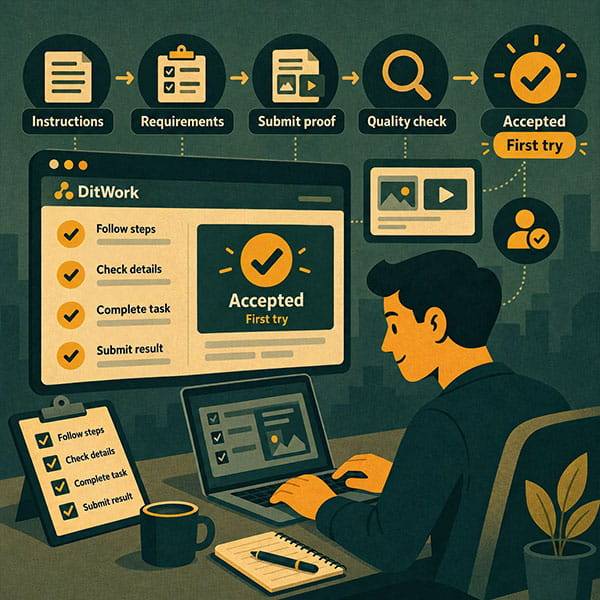
Do a final check before submitting
- Were all required steps completed?
- Did you use the correct link and data?
- Did you use the correct unique value?
- Is the required proof attached?
- Does the proof show the final result?
- Is every required report field complete?
Keep your proof after submission
Do not delete screenshots, links, or files until the result is accepted. They may be useful if clarification is requested.
What happens after submission?
The result moves into review. A microtask has a review period, so the lack of an instant response is not a rejection.
After approval, DitWork records the result as accepted and credits the worker for the completed microtask.
Common reasons microtask results are rejected
- the wrong action was completed;
- a required step was missed;
- the proof does not confirm the result;
- the wrong link or assigned value was used;
- the report is incomplete;
- the completion window was missed.
How to avoid microtask rejection
For reliable earnings from microtasks, focus on accepted results rather than the maximum number of tasks started at once.
If a result is already rejected, read What to Do If a Client Does Not Accept Your Completed Microtask.
How to complete paid microtasks efficiently
Paid microtasks reward a correct result, not simply time spent on the page. Attention to instructions, clear proof, and a complete report matter more than rushing.
A simple start-to-approval example
Suppose a task asks you to register on a site and submit a screenshot after successful registration.
- Read all instructions.
- Check whether a genuinely new account is required.
- Reserve the task and check the available time.
- Open the exact target link.
- Complete the registration.
- Take a screenshot of the final success state.
- Open the screenshot and verify it clearly shows the result.
- Attach it and submit the report.
- Keep the evidence until approval.
If the instructions are unclear
Do not guess. It is better to skip an unsuitable task than to complete a random interpretation and hope it is accepted.
If the external site or app is not working
Do not fabricate proof or submit an old screenshot. Recheck the link and avoid claiming a result that did not happen.
Safety while completing microtasks
Do not share account passwords, email access codes, banking details, or other sensitive credentials. If software installation is required, understand the source and purpose before installing it.
Quick checklist before submission
- Full instructions read.
- All required actions completed.
- Deadline still active.
- Correct target and assigned data used.
- Proof shows the final result.
- Report follows the requirements.
- Links and files checked.
- Evidence kept until review is complete.
How to start completing microtasks on DitWork
If you are new, read How to Earn on DitWork: A Beginner's Guide.
Then open the microtasks section, choose a clear task, and use this checklist.
The main point
To complete a microtask correctly the first time, choose carefully, read the requirements before starting, meet the deadline, and submit proof that directly confirms the requested result.