
How Money Works on DitWork: Main Balance, Projects, and Microtask Budgets

How Money Works on DitWork: Main Balance, Projects, and Microtask Budgets

Get freelancer offers within your budget
Describe your task, compare offers, and choose a specialist by price, timing, and experience
Post a task Browse projects

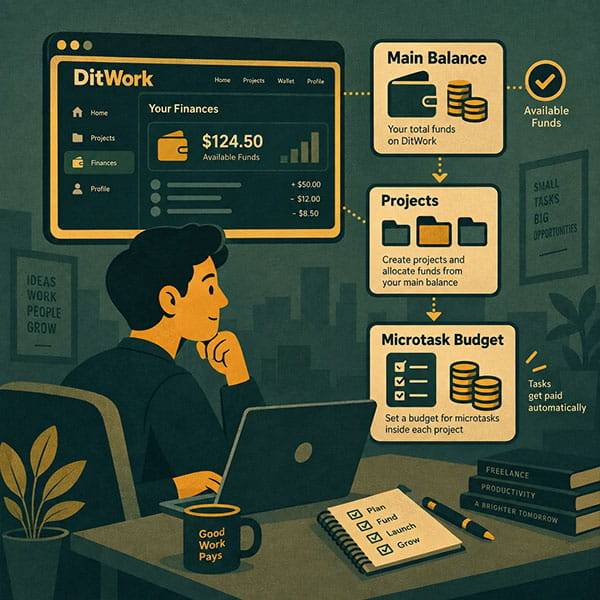
DitWork uses several financial concepts that can look similar. The key difference is between the main account balance and the budget of a specific microtask.

Main balance

The main balance belongs to the account as a whole. When a microtask result is approved, the worker reward is credited here.

Why a microtask has a separate budget

Funds must be allocated to the task before they can support new completions. Money on the main balance alone does not mean the microtask is funded.

Funding a task from the main balance

If the main balance already has enough funds, you do not need another external deposit. You can allocate the required amount to the specific task budget.

Deposit and internal funding are different

A deposit adds new money to the account. Internal task funding reserves money that already exists for a particular microtask.

Auto-refill

Long-running tasks can automatically receive additional funding from the main balance when configured conditions are met and enough free funds are available.

See Microtask Budget.

Projects and microtasks

Projects use proposals with a price and deadline, and the client selects a specialist. This project payment flow is different from the dedicated budget used for mass microtasks.

Use projects for individual specialist work and microtasks for many similar completions.

Where worker earnings go

After an approved microtask result, the reward is credited to the worker's main DitWork balance.

Reward and budget are different

The reward is the payment for one accepted result. The task budget is the total amount allocated to that microtask.

See Microtask Payment.

Microtask money flow

  1. Funds are available on the main balance.
  2. Create the microtask.
  3. Allocate funds to the task budget.
  4. Workers complete the task.
  5. Approve results.
  6. Rewards are credited to worker main balances.

Full lifecycle: What Happens After Launching a Microtask.

Project money flow

  1. Create a project.
  2. Receive proposals.
  3. Select a freelancer.
  4. The following payment belongs to that project, not to the microtask budget.

Withdrawals

Available withdrawal options can be checked on the withdrawal page.

The main point

The main balance belongs to the account, projects have their own pricing and payment flow, and microtasks have a dedicated budget. If money is already on the main balance, funding a microtask means allocating it to the task rather than paying the account again.


Useful links on this topic

Microtask budget
Understand why task funding is separate from the main balance.
Microtask lifecycle
From creation and funding to approval and payment.
Projects
Post an individual task and receive freelancer proposals.
Create a microtask
Create a mass task and configure its budget.

Frequently asked questions

What is the difference between the main balance and a microtask budget?
The main balance belongs to the account as a whole, while a microtask budget contains funds allocated only to one specific mass task.
Do I need another deposit if my DitWork main balance already has money?
For a microtask, you normally allocate existing funds from the main balance to the task budget rather than create another external deposit.
Why can a microtask stop even when the main balance has funds?
New completions are funded from the specific task budget. The main balance alone does not replace task funding.
Do projects use the same microtask budget?
No. Projects have their own project pricing and payment flow.
Where is a worker's microtask payment credited?
After approval, the reward is credited to the worker's main account balance.
How is reward per completion different from the task budget?
The reward is the payment for one accepted result, while the budget is the total funding allocated to the microtask.

How useful is this article?

Tap a star to rate.

Average rating: 0/5. Total votes: 0.
DitWork main balance
microtask budget
fund microtask budget
transfer money to task budget
DitWork project payments
DitWork balance
microtask funding
Views: 44
Other articles

How to Choose a Freelance Platform: What Matters for Freelancers and Clients

Freelance, remote work, and online platforms - these terms are everywhere. But when it’s time to choose the actual platform to work on or hire freelancers, things get tricky. Not all freelance websites are created equal. So how do you pick the right one? Especially if you're just starting or tired o...

Read more...

Why a website is slow and where it is profitable to order website speed optimization from a freelancer

A slow website rarely looks like a critical problem until the business starts losing money. Pages open a little slower than they should, the cart hangs, the mobile version does not load right away, and the user leaves for a competitor without even reading the offer. That is exactly when business own...

Read more...

Making money online - how to start without experience or investment and find your first projects

Today, the topic of making money online attracts more and more people. Some are looking for extra income in their free time, while others want to fully switch to remote work. The main thing is to choose the right direction and understand what really works and what is a waste of time. Making money...

Read more...

How to order Google Ads without wasting your advertising budget: a practical guide for business

When a business needs clients quickly, one of the first tools website owners and companies think about is Google Ads. And that makes sense: pay-per-click advertising makes it possible to appear in search results almost immediately, drive targeted traffic to a website, and start receiving leads witho...

Read more...